
Choose Active Roles
As a mart admin, it can be difficult to troubleshoot your users’ permissions issues, especially if you manage many users and roles. If you want to experience your mart from the perspective of a particular role (or subset of roles), you can now put yourself in that role and then choose that role as your “active role”. The system will behave as if that is your only role. This article explains how do do this.
Setting up roles
In the how to articles you may find the material on how to create a role, how to change the permissions per role and how to add users to a role.
Select List of roles
If you click on the user name in the top right corner, a list of your roles will appear.
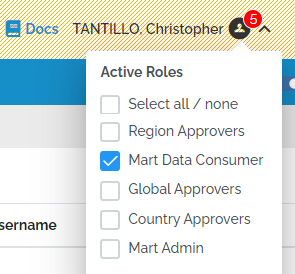
If, For example, you wish to experience your mart as a user in a “Mart Data Consumer” role, put yourself in that role and then choose that role as your only active role. The Pipelines, Load and Admin menus are now hidden (Model is still viewable to data consumers).
Furthermore, beyond assigning a particular role to yourself, you can opt to not assign any role. In this case you can check how the system responds on unauthorized access.
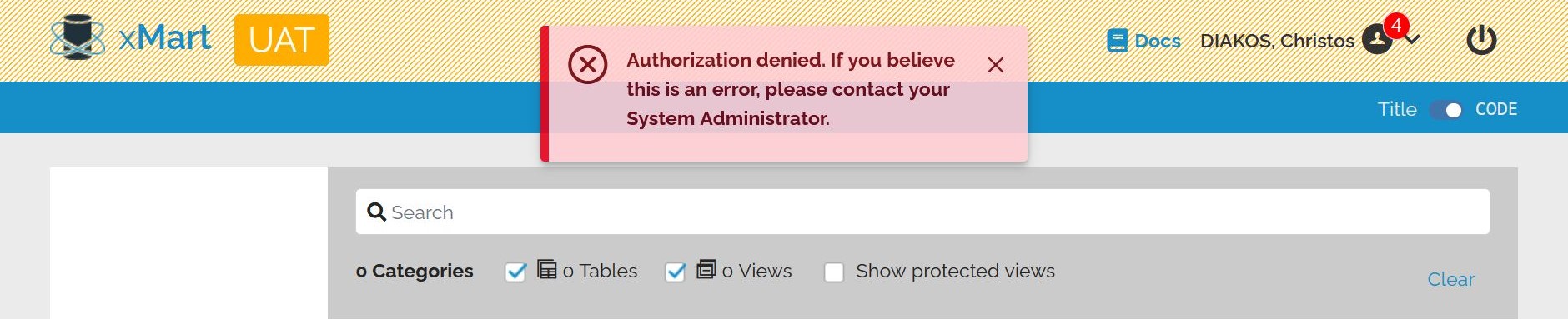
On a small note the red notification icon next to your name, indicates the number of roles that are available to select. So, if you have in total 4 role assigned to you and none select, you’ll see the number 4.
The active roles only apply in the mart where the selection was made. It will not affect your experience in other marts nor in the top-level pages.