
Version 4.32
Enhancements
TestRow user interface
The TestRow validation rule is the most versatile rule which allows testing between fields and literal values on a row, including grouping of terms and control over AND and OR operators. A user interface (UI) has been provided to make it eaiser to use. It is still possible to edit its xml definition, and even switch between the UI and xml.
Below is a rule created using the UI and the XML automatically generated by it.
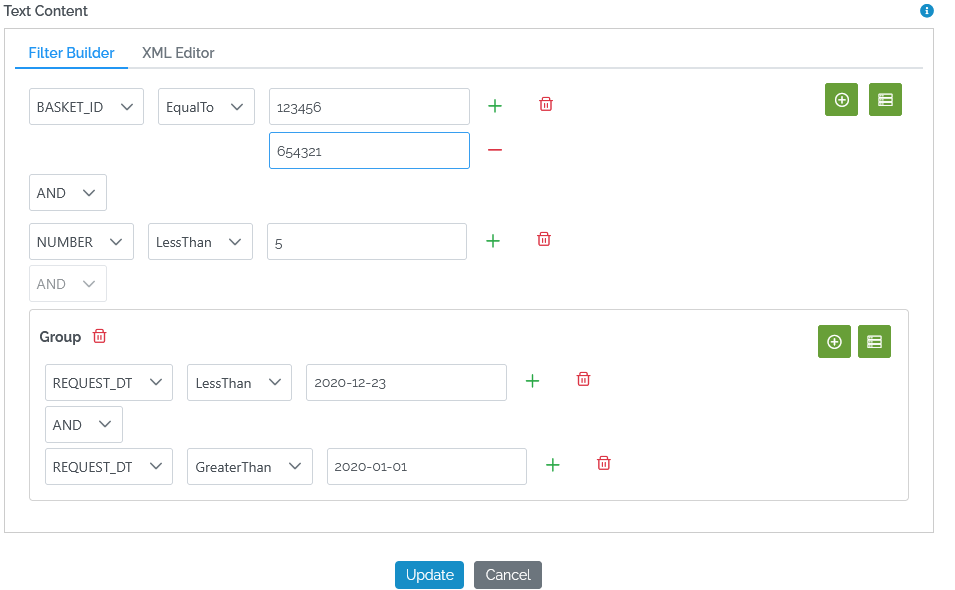
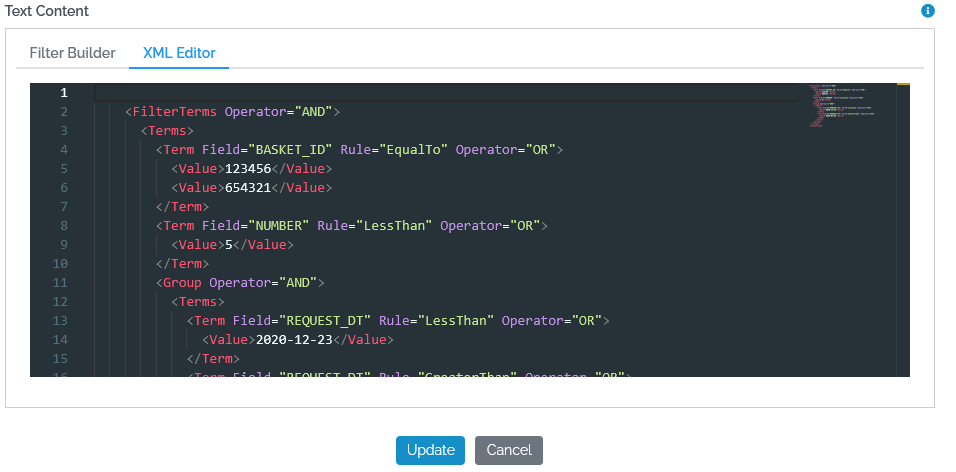
Please see the how-to article on validation rules for more information about the TestRow validation rule.
Display user access to table/view in data catalog
A new tab called “Access” is available on the Data page to users with MART_MANAGE permission (mart admins), which lists all users who have read-access to the table or view.
The tab lists people users but also client applications (external applications) and xmart service accounts (other marts) which have access to the table/view.
A prominent message is displayed if the table/view is available to the anonymous public via API.
Click on any row of the Access tab to open that user for editing in the Admin area.

Improved whitespace UPDATEs display
In the batch preview whitespace differences for some updated records used to be hidden; the old and new values looked identical:

The system now displays whitespace differences more visibly:

Allow USER_MANAGE perm to edit RLS property values
It’s now possible for a mart admin to delegate to another user the assignment of row-level-security property values by assigning that user the USER_MANAGE permission. The USER_MANAGE permission can be assigned to another user for a set of roles and that user can then add or remove users from those roles and now also assign values such as country ISO codes to those users.

In the user edit popup:

Conditional batch approvals
For those using the batch approval process, the ability to control whether approvals are needed depending upon the change type has been added. A new ChangeTypes attribute on the Step element allows you to add a comma-separated list of each change type that will trigger an approval.
For example, to only receive approval notifications when a record is deleted:

Possible values are NEW, UPDATED, SOFT_DELETE, REPLACE.
Refresh button added to custom views page
For those users which have direct database access and continue to edit custom SQL views using SQL Management Studio (SSMS), a Refresh button has been added to the custom views UI page to update the list of views if a new one has recently been added via SSMS and does not yet appear in the list.

Archive retention period
xMart has always archived updated or soft deleted records when the MERGE load strategy is used (but not when REPLACE is used).
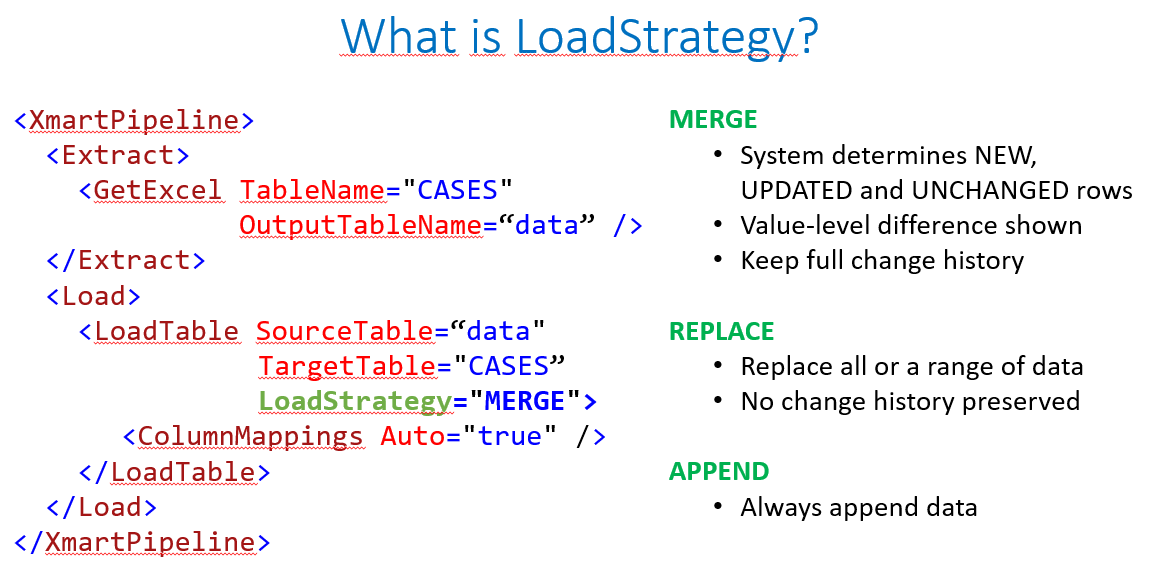
A new retention period is now available, per storage table, which optionally puts a time-limit on the retention period for archived data.
In the test environment, the default for this setting will be 7 days. In the production environment, the default for this setting will effectively be infinite (999,999 days).
Users are encouraged to reduce this setting to 0 if they do not require archival of old, updated or soft-deleted data. The setting is available on a new Settings tab for each table in the Model area:
 .
.
The retention period will be encouraged by sys admins for tables which do not need archived data and for “run away” tables which steadily increase by the number of their current rows.
Display NEW records after deletion of temp tables
It is now possible to view NEW and DELETED records in the batch preview after temporary staging tables have been deleted.
Other Changes
- #6158 User Properties appear twice
- #6157 Overlapping text in maximize window mode
- #6155 Batch Preview Screen does cut columns to match edge of screen
- #6166 File not uploaded by same user error during SysAdmin mart import
- #6143 Intra-batch FKs to duplicated records marked as NEW for INSERT
- #6133 An old (broken) custom sql view does not appear on the custom views page
- #6139 Repeating items in RLS setup table/view dropdown
- #6144 Exception occurred while committing Batch: Nullable object must have a value. when starting a PostRun
- #6134 Can’t see full list of tables/views in object browser.
- #6130 Cannot edit RLS for one particular user via front end
- #6115 Pipeline produces server 500 error when publishing but not when testing
- #6118 Batch preview stage table columns have huge width
- #6120 Forms stay in Design mode.
- #6125 Form Edit button is displayed for users without FORM_MANAGE permission
- #6004 Error row counts look odd
- #6085 system subform model download fix
- #6081 SYS_ACTIONS title appears on data edit
- #6074 add system subform as field generates an error
- #6076 Approvals give an error message
- #6074 Add Field to Form on Subforms generates an error
- #6056 Data table header not visible if too long and small values
- #6028 Create View Autofill on table puts in extra []
- #5820 System-run batch cancellation looks like user cancellation but is system timeout
- #6062 Forms fields losing settings on update form properties
- #6048 Generated OData $filter wrong for number types and IN operator
- #6068 GetAccess - Not a legal OleAut date
- #6056 Data table header not visible if too long and small values
- #5994 Batch sql performance improvements
- #6047 Add Client Application to a Role doesn’t allow entry of a Client ID
- #6042 Error with exported excel file because worksheet name duplicates named range name.
- #6043 [object Object] displayed during rollback
- #6053 Can’t leave batch preview page
- #6046 Table validation rule: can’t create a new TestValueInRange
- #6040 Can’t open FK value on History tab and some tweaks
- #6051 CPU on web server at 100%
- #5943 Object browser feedback - should be opened by default
- #6044 No permission to view data history batch message when there is no data to show (e.g REPLACE)