
Version 4.35
Features
FilesFromWebService (looping)
FilesFromWebService is a new pipeline flow command that supports looping to extract multiple pages of data from a remote web service. In each loop, FilesFromWebService makes a new http request to retrieve the next page of remote data, and passes the data as a file to a normal pipeline, creating one batch per loop/page of data. The most common patterns of modern, paged data web services are supported (primarily page number, next link, and continuation tokens).
Please see the article on FilesFromWebService and the FilesFromWebService command reference for details.
FilesFromSharepoint command
FilesFromSharepoint is another new flow pipeline command which processes all files that match a pattern in a SharePoint/OneDrive folder, including files in subfolders. New or changed SharePoint/OneDrive files in the folder which match the pattern will automatically be processed, allowing your mart to effectively synchronize data from the SharePoint site. Like the other FilesFrom* commands, FilesFromSharePoint also remembers which files have been processed and by default does not re-process them if they have not changed.
Please see the article on FilesFromSharePoint and the FilesFromSharePoint command reference for details.
Record change history
The ability to see the change history of a record is now possible. On the data view page:
- Click the compare rows icon
- Select 1 record
- Click the “Record Change History” button which appears
- Options to view all fields rather than just the changed fields (default) and to download the comparison.
- Option to open in full-screen mode
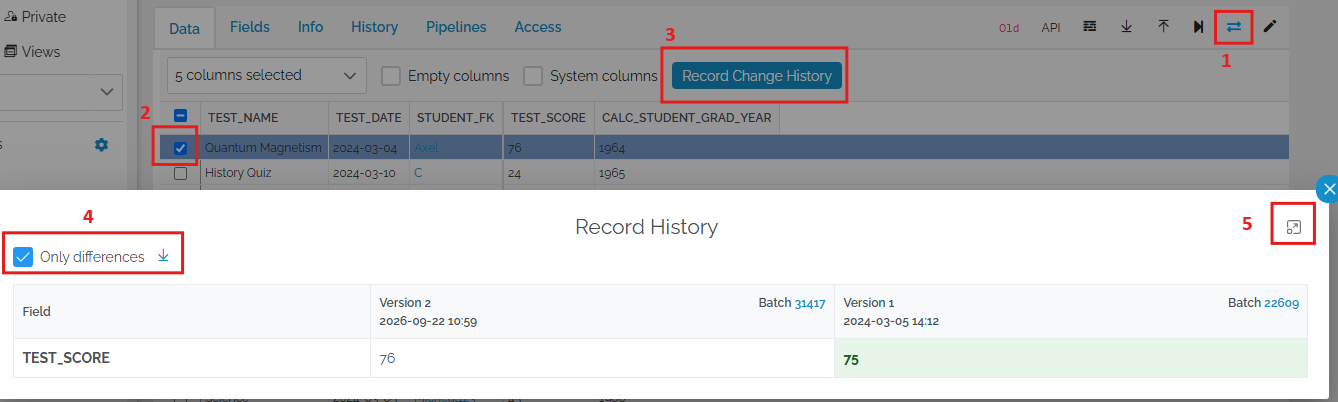
If you select 2 or more rows, a comparison of the selected rows will appear (without record history).
NormalizeText transform command
NormalizeText is an all-in-one text value cleaning and normalizing transform. In a single command, NormalizeText can remove accents, special characters, punctuation, leading zeros, whitespace and can also reduce years to 2 digits. Original values such as “Bà Rịa–Vũng Tàu” can be converted to “Ba Ria Vung Tau” or to “BÀRỊAVŨNGTÀU” or to “BARIAVUNGTAU”, depending upon the settings. Resulting values can be used as identifiers or reduce the number of synonyms that need to be maintained to perform successful matching to reference data.
The defaults of NormalizeText are such that for many scenarios you just need to do this in a pipeline:
<NormalizeText />
NormalizeText can also be used inside the <Lookup> element of the HierarchyLookup transform.
Please consult the NormalizeText command reference for details and examples.
Enhancements
General
Expand issue table columns
Column widths of tables on the Issues tab of the batch preview page are now adjustable by dragging them.
Batch file download link
Raw data files attached to successful batches can now be downloaded via hyperlinks from inside or outside of xMart (ie in an external application, user security applied).
Links to raw data files follow this pattern:
https://{base url}/{mart code}/files/download?fileId={8 digit batch ID}__{raw file name}
“8 digit batch ID requires leading 0 padding. Example:
https://extranet-uat.novel-t.ch/xmart4/critter_test/files/download?fileId=00031417__original_filename.csv
Navigating this link opens a file download page similar to file download pages on the internet. The message “Your download should begin shortly. ‘Click here’ if it doesn’t.”

As an added benefit, these links can be put into xMart tables to be combined with metadata columns such as country, year, etc.
Pipelines
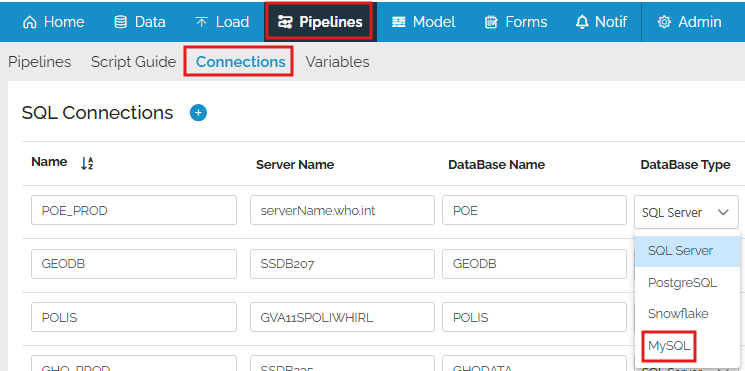
Extract data from MySql
MySQL databases have been added to the list of data sources that data can be extracted from using the GetDB command.
Extract data from Parquet files
A GetParquet extraction command has been added to load data from Parquet files used in popular cloud storage systems and data lakes such as Apache Hadoop and Azure data lake.
See GetParquet command reference.
GenerateID for partially populated columns
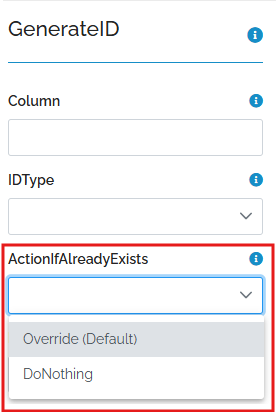
The GenerateID pipeline transform command has a new attribute, ActionIfAlreadyExists, which controls whether existing values get overridden or left as-is. This allows GenerateID to generate ID values just for blank/empty values in a partially populated column.
View Http Headers in debug mode
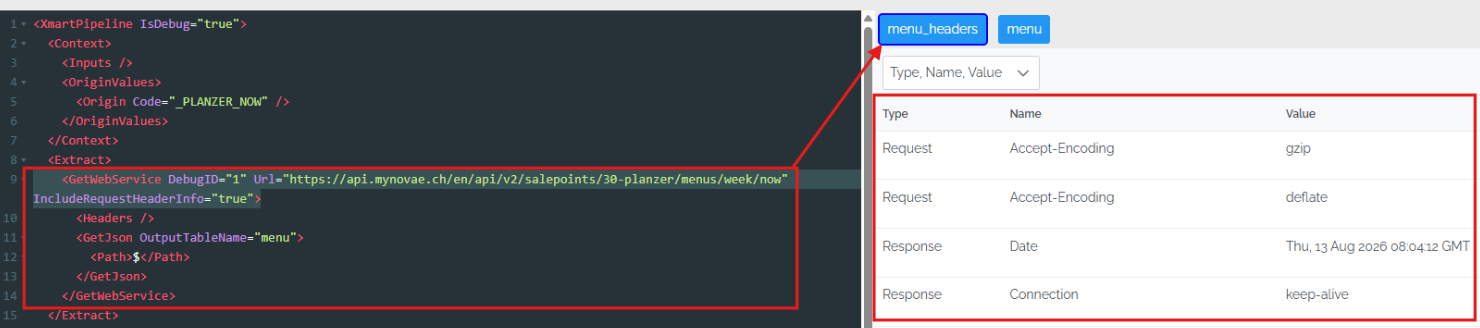
To make it easier to debug extracting data using the GetWebService command, http Request and Response headers are now available during debug mode. In the code window, when you select the line with GetWebService, a pipeline table with suffix “_headers” becomes available in the right panel containing both Request and Response headers.
HierarchyLookup NormalizeText and similarity matching
For users of the HierarchyLookup transform command (useful for subnational place name matching), there are 2 enhancements:
-
The new
<NormalizeText command>(above) can be used inside each<Lookup>element to normalize text before matching. -
A new
<SimilarityMatching>sub-command can be used inside each<Lookup>element. SimilarityMatching allows matching of values that are similar but not identical, based on a similarity algorithm. This can minimize the need to create large numbers of synonyms for small variations.
SimilarityMatching can have an effect on the user interface during data loading. It can require be configured to require manual approval by the person doing the data loading.
For more details and examples, see the section on using NormalizeText and section on using SimilarityMatching in the HierarchyLookup article and also the HierarchyLookup command reference.
Improved debugging of JoinTables
Pipeline debugging of JoinTables command has been improved to improve visibility of all columns involved.
Improved debugging of SysIDLookup
In debug mode, SysIDLookup commands can now be debugged. It is possible to click on them and see the state of the tables at that point in the pipeline.
Deployment
6624 Transform mart deploy package model.xlsx to list of csv for easier git tracking
The zip file created during [mart export] now includes csv files of the various “model” tables, in addition to the xlsx file. This makes it easier and more effective to put these tables under source control for better change tracking (change tracking of xlsx files doesn’t work well). “Model” tables include tables.csv, tableFields.csv, tableRules.csv, forms.csv and formFields.csv.
Other Changes
- #6725 Usability improvement to issues tab
- #6691 Display reason for stopping flow in batch preview
- #6603 GetOData should return correct structure even if no data is returned
- #6495 Optimize commit_requests queues to avoid waiting too long for small manual batches
- #6664 Implement caching authorization access token to prevent duplicate token requests in GetODataCommand
- #6513 2 Add sections in script guide with identical url
- #6750 Hide forms home page widget if there are no forms
- #6683 Rework system model Import to handle missing files
- #6788 Can’t add all service accounts from Role page or generic Add user button
- #6772 Missing permission issue despite i have Super Admin role
- #6570 Critical error during commit of batch flow: INSERT statement conflicted with the FOREIGN KEY constraint
- #3753 TABLES’s RowTitle should not be generated with a suffix
- #6763 Invalid type in Input doesn’t produce a meaningful error message
- #6613 Forms deployment fails because origin is not yet created
- #6785 Test a draft pipeline does not allow to re-use previous file
- #6779 Data catalog view shows “0 rows” after data upload
- #6783 Bug Change From ForeignKey type to Other Type (GUID)
- #6704 Remember column name sort ordering in Data Filter
- #6735 SetColumnDataType Bug Reported by Polio: unable to cast object of type String to Int64
- #6729 Error Message for JoinTables needs to be improved
- #6740 Tool tips remain on screen
- #6717 The second flow command does not start if the last cmd batch has 0 changes
- #6743 DataToModel suggests wrong Boolean type for INTEGER column in CSV file
- #6780 Allow user-defined table functions in Pipelines and Views